
Second episode of Adventures in Blockspace. Featuring more explosions and more horrible mispronunciation!
Friday, 24 June 2011

Tuesday, 21 June 2011
Adventures in Blockspace
The secret of Canthuris
Grindboy and Vendroma are back for our 1st episode of Adventures in Blockspace. A weekly playthrough of adventure maps.
We awake one morning to find 3 paths outside our log cabin. Where do they lead? How many times can we possibly die in one map? And will we ever pronounce Canthuris correctly?
Got an adventure map which would work with 2 players tweet it to @michaelgomes or @vendroma or find me on the Minecraft forums (Grindboy)
Grindboy and Vendroma are back for our 1st episode of Adventures in Blockspace. A weekly playthrough of adventure maps.
We awake one morning to find 3 paths outside our log cabin. Where do they lead? How many times can we possibly die in one map? And will we ever pronounce Canthuris correctly?
Got an adventure map which would work with 2 players tweet it to @michaelgomes or @vendroma or find me on the Minecraft forums (Grindboy)
Monday, 2 May 2011
Easily run Napster in Ubuntu
I was drawn into the streaming music services by the Spotify Free system. This required you to be invited by someone who paid for Spotify. You then got unlimited free access to the Spotify streaming catalogue with adverts (which never bothered me). The Spotify desktop software ran pretty well in wine as long as you updated a DLL file everytime WINE updated and all was right with the world.
Then Spotify committed the heinous crime of trying to force free subscribers to pay for the service by reducing all the free accounts (both Spotify Free and Open) to 10 hours of listening a month and a maximum number of plays of an individual track to 5, total, for the life of the account.
So, the solution? Move to another streaming service! The hero of this story comes from an unlikely past (an anti-hero as it were). Napster used to be the biggest name in music piracy, if you wanted to contaminate your computer with trojans, worms and general malware whilst downloading music illegally you went to Napster (the stupidity of copyright law when it pertains to an infinitely copyable medium is a different rant!). In recent years (after being sued and legislated into the ground) Napster has returned as a legitimate streaming and download service.
Napster drew me in because for £5 a month ($10) you get unlimited streaming and 5 free MP3s a month. This second bit allows me to wean myself off of streaming services. The only issue with the service is that there is only a Windows client (not even a Mac one!). Thankfully they do offer a web interface. After a couple of days of testing I've found 1 and a 1/2 ways to run Napster in Ubuntu.
Starting with the 1/2 we have WINE. This compatibility layer enables Windows programs to run in Linux. Napster requires WMP10 to run correctly so the first step is to install WineTricks and install WMP10. Then the installation of Napster can take place the same way you'd install any other program.
Napster installs and runs fine, as far as I can tell. This solution is 1/2 a solution because it stalls at the login screen meaning you can't actually play any music. It does this because Napster requires cookies to be enabled in Internet Explorer (something I am yet to figure out).


Then Spotify committed the heinous crime of trying to force free subscribers to pay for the service by reducing all the free accounts (both Spotify Free and Open) to 10 hours of listening a month and a maximum number of plays of an individual track to 5, total, for the life of the account.
So, the solution? Move to another streaming service! The hero of this story comes from an unlikely past (an anti-hero as it were). Napster used to be the biggest name in music piracy, if you wanted to contaminate your computer with trojans, worms and general malware whilst downloading music illegally you went to Napster (the stupidity of copyright law when it pertains to an infinitely copyable medium is a different rant!). In recent years (after being sued and legislated into the ground) Napster has returned as a legitimate streaming and download service.
Napster drew me in because for £5 a month ($10) you get unlimited streaming and 5 free MP3s a month. This second bit allows me to wean myself off of streaming services. The only issue with the service is that there is only a Windows client (not even a Mac one!). Thankfully they do offer a web interface. After a couple of days of testing I've found 1 and a 1/2 ways to run Napster in Ubuntu.
Starting with the 1/2 we have WINE. This compatibility layer enables Windows programs to run in Linux. Napster requires WMP10 to run correctly so the first step is to install WineTricks and install WMP10. Then the installation of Napster can take place the same way you'd install any other program.
Napster installs and runs fine, as far as I can tell. This solution is 1/2 a solution because it stalls at the login screen meaning you can't actually play any music. It does this because Napster requires cookies to be enabled in Internet Explorer (something I am yet to figure out).

The fully working solution involves the use of the web interface. The interface runs with numerous bugs in Chrome on Ubuntu but runs perfectly well under Firefox. This is a problem for people who don't run Firefox. However the Mozilla team has provided a solution. Prism is a application created by the Mozilla team which turns any web app into a standalone application (sort of!). For our purposes it allows us to run the Napster web app as if it were the native client.

So until cookies can be enabled in WINE, and there is no guarantee that there won't be yet another problem to be solved after that one, using the web app though Prism is the simplest and most reliable method for running Napster in Ubuntu. If necessary I'll update this post with specific installation instructions if there is a call for it, although I'm busy with exams for most of the month.
[edit] Just tested the music download feature within Prism and it works perfectly using song credits, I haven't tested buying them using a credit/debit card.
Monday, 6 September 2010
What would a Geek take to the Jungle
Anyone who has read this blog before knows that I am an unashamed geek. With my university I'm lucky enough to be going to Borneo on Thursday. So as a geek what am I taking to the Jungle?

So I'm taking;
Click to see a larger tagged version.
So I'm taking;
- 1x iPod Touch
(1st Gen) filled with music and games for the 8 hour coach journey to Heathrow, the 4 hour wait at Heathrow, the stupidly long flight (God knows how long it really is my itinerary goes on local time!?!?!?), and all the journeys back again!
- 1x pair of Sony MDRNC7B Noise Cancelling Headphones
For previously mentioned journey! I've also got 2 airline adapters just in case the in flight movie turns out to be something good!
- 1x Nokia 6300. One of the downsides to owning a smartphone is battery life and while having the internet with me on the coach would be awesome I'd rather not get to Heathrow and have my battery die just when I need to call people so we can meet up! My 6300's battery comparatively will last me about 8 days and will charge from just trickle of power.
- 1x Kodak PlaySport Camcorder. I bought this camcorder specifically for Borneo. The damn thing is waterproof, drop proof, humidity proof and leech proof. It shoots in 720p at 30 and 60fps and 1080p at 30fps, has an excellent low light sensor and only a 4 second start-up time so I won't miss the action because I'm waiting for my camera to switch on.
- 1x 6.3mp Fujifilm Finepix A610. This little point and shoot has kept running for years and years, it takes excellent photos and with a firmware upgrade now supports SDHC cards meaning I'm not going to run out of room (16GB SDHC card = 10,000 photos)
- 3x 16GB SDHC cards. Enough storage for my camera and camcorder.
- 6x USB powered AA Batteries. Found these at Firebox.com but discovered that Tesco and some service stations also sell them. The positive end of the battery comes off revealing a male USB port allowing these batteries to be charged from any USB port. I'm probably going to take a backup pack of normal AA batteries but hopefully these will work well
- 2x Wind up torches. Torches always have a habit of dying right when you need them. I'd rather not be walking to the toilet at night in the rainforest and have my torch give out. One is a head torch the other is a hand torch which includes an DC out port for charging mobile phones.
- 1x FreeLoader Solar Charger. The Freeloader is an awesome emergency battery pack combined with a large solar panel. The panel charges the battery in 4 hours of direct sunlight and can then be used to charge anything using the included adapters. It also has a female USB adapter meaning that if a device will charge off of USB it'll charge off of this solar panel.
- 1x Platypus 3.0 litre water container. This thing is just plain cool. I can fill it full of water at the beginning of the day, shove it into my backpack and sup all day long.
- Non-tech gear/other essentials. X Large Trek Towel, folds up very small, dries very quickly and is antibacterial. Buff Headband, its the rainforest I'm going to sweat this'll keep it out of my eyes. Various waterproof bags filled with silica gel. Pen knife. Handlens. Sun hat. Sun cream. Small first aid kit. A bar of shampoo soap, awesome product from Lush, its shampoo but solid! Autan insect repellent, as good as DEET but without the risk of an allergic reaction. Compass. Alcohol Gel handwash.
Friday, 3 September 2010
In Search Of Tux Episode 2: T-mobile Pulse Unboxing
Episode 2. I think I'm getting better at editing these videos. Let me know what you think in the comments either on this blog or at the YouTube page.
Sunday, 15 August 2010
In Search Of Tux Episode 1: Xbox 360 S 250gb unboxing
Sorry for the lateness of this video. The title and credit sequences took longer to sort out than I expected.
Friday, 16 July 2010

Tuesday, 19 January 2010
Why I'm excited about the Apple Tabet

The almighty Apple Tablet has been rumoured since before the iPhone but in recent months these rumours have hit fever pitch culminating in the belief that Apple will announce their
I have no illusions that the Apple Tablet will be anything other than overpriced. I am however still excited about it. Before the iPhone was released in 2007 the touch screen phone market was stale and unattractive, since then however your not a major phone company unless you have a touch screen smart phone. Apple has a knack for reinvigorating any market they enter. I believe the same will be true for the tablet PC market. It is currently fairly stale with few OEMs making tablets and fewer making tablet accessories.
I'm currently awaiting delivery of a 2nd hand Motion M1400 tablet PC and of course the hunt for accessories has begun. Keyboards aren't a problem as bluetooth is a standard. Things like cases however are a bigger problem. A case in point (no pun intended!) is from a company called OtterBox this company is know for making hugely rugged everything proof cases and they used to make a tablet pc case which would have been perfect for use on field trips etc. However because the market has been stagnant for so long Otterbox no longer make this case.
Being a Linux user and advocate I will be looking to install Linux on my shiny tablet PC. Easy, I thought, Linux is so adaptable that someone will have made a tablet orientated *buntu by now. This however isn't the case. The few tablet orientated projects that exist have not seen new code or refinements for years. The Linux community is renowned for its ability to make new ideas its own. Days after the launch of Windows 7 the community figured out how to get Compiz to emulate Aero Snap. Hopefully Apple will make Tablets "trendy" again making accessory makers and the Linux community sit up and take notice of this platform.
On an unrelated note: I've finally figured out how to get Blogger to notify me of comments on this blog so comment away and I'll get back to you quickly
Also, since when did I actually start getting visitors to this blog? I've got over 30,000 views! Thank you :-)
Saturday, 19 December 2009
Why I'll never buy another Microsoft product.
About a week ago my motherboard gave out on me. Luckily I'm running an AM2 chip meaning that a replacement was fairly inexpencive. After putting the new motherboard in I booted into Ubuntu 9.10 without any problems. I boot into Windows 7 however and apparently my copy is "not genuine" and a few seconds after boot I get told I might have been the victim of piracy. Now I'm tech savy enough to know that 7 is just throwing a hissy fit over the change in hardware so I go to the activation screen and re-enter my code only to be told that because my hardware has changed my license is no longer valid. I am told to call a toll-free number and input a 48 digit code just to recieve another 48 digit code which I input into the activation menu.
Ironically this total palarva would have been avoided if I had been running a pirated copy of Windows 7 as a pirated copy would have had the activation checks removed!
I will not be buying Windows 8 no matter what features it has. From this day on I no longer consider myself a Microsoft customer.
Ironically this total palarva would have been avoided if I had been running a pirated copy of Windows 7 as a pirated copy would have had the activation checks removed!
I will not be buying Windows 8 no matter what features it has. From this day on I no longer consider myself a Microsoft customer.
Thursday, 20 August 2009
HTC Hero on Virgin Mobile
 My current mobile phone provider, Blyk, is about to stop supporting its mobile phone network side of the business. For me this means that by the 26th August I will no longer have a phone service.
I've been looking for a new mobile network and decided on Virgin Mobile. The network piggy backs on T-mobile, which has good signal strength at my house. I went for a SIM only deal which gives me unlimited texts, unlimited web (very important for Android) and 300 minutes a month for £18.
Got my SIM this morning popped it into my phone and realized that the 3G wasn't working. After quite a bit of Googling the settings are as follows:
Name: Virgin Internet
APN: goto.virginmobile.uk
Proxy: not set
Port: 8080
Username: User
Password: Not set
Server: 193.30.166.003
MMSC: http://mms.virginmobile.co.uk/8002
MMS Proxy: 193.30.166.4
MMS Port: 8080
MMS Protocol: WAP 2.0
MCC: 234
MNC:30
APN type: *
I don't think these settings make MMS work but if I find them I'll post them up.
Saturday, 8 August 2009
Tumblr
Just a quick post to let you know that I'm trying out Tumblr. I'll post a link when I've finished tweaking!
Et Voila: http://www.grindboysthoughts.tumblr.com
Et Voila: http://www.grindboysthoughts.tumblr.com
Friday, 24 July 2009
Jolicloud Review
If you read my post on instant-on/cloud operating systems you'll know I'm enthralled by the idea of not having any data locally but still having very fast access. This all started when I learned about the existence of Jolicloud an OS which lives mostly in the cloud. Sadly at the moment Jolicloud is in private alpha so I signed up for an invite and waited a few months.
 The main (?) interface
Yesterday I got an email from Jolicloud with an invite and subsequently a download link :-) installation was very similar to Ubuntu NBR because Jolicloud is based on it. I installed it very similarly to my NBR installation as a result boot times are very fast from the 4GB SSD (less than 25 seconds)
First Impressions
What surprised me was that instead of booting into the Jolicloud interface it booted into a stripped down UME launcher. I've now discovered that the UME laucher IS Joliclouds main interface. This can make the experience slightly jarring as you install applications (both web and native) from the Jolicloud interface but cannot launch them from there.
The one click graphical installation is a wonder to behold and at the moment very useful but I'm not sure how useful it will be once there is a larger range of applications. The universal people and applications search will probably help.
Having downloaded the Twitter and Facebook "apps", which are simply Prism bookmarks, I was surprised that they didn't integrate with the Jolicloud interface. The main page of the Jolicloud Interface is an activity feed for your friends this however doesn't extend to Twitter and Facebook. It would be nice to open Jolicloud and see updates from the people I'm following on Twitter. Of course there might be a setting for this but the settings are strewn across the system, would it be in the settings menu on the UME launcher or in the Jolicloud interface or in the settings of the Twitter program?
This discontinuity also extends to the search bar which will allow me to search application and (the rather cryptically named) "people" at first glance for a social OS you'd think this would be Twitter and Facebook profiles but it is limited to the profiles of other Jolicloud users.
At the moment I must admit I'm a little disappointed but being an Alpha product I'm going to assume that tighter integration with the rest of the OS and web services is coming.
 The main (?) interface
First Impressions
What surprised me was that instead of booting into the Jolicloud interface it booted into a stripped down UME launcher. I've now discovered that the UME laucher IS Joliclouds main interface. This can make the experience slightly jarring as you install applications (both web and native) from the Jolicloud interface but cannot launch them from there.
The one click graphical installation is a wonder to behold and at the moment very useful but I'm not sure how useful it will be once there is a larger range of applications. The universal people and applications search will probably help.
Having downloaded the Twitter and Facebook "apps", which are simply Prism bookmarks, I was surprised that they didn't integrate with the Jolicloud interface. The main page of the Jolicloud Interface is an activity feed for your friends this however doesn't extend to Twitter and Facebook. It would be nice to open Jolicloud and see updates from the people I'm following on Twitter. Of course there might be a setting for this but the settings are strewn across the system, would it be in the settings menu on the UME launcher or in the Jolicloud interface or in the settings of the Twitter program?
This discontinuity also extends to the search bar which will allow me to search application and (the rather cryptically named) "people" at first glance for a social OS you'd think this would be Twitter and Facebook profiles but it is limited to the profiles of other Jolicloud users.
At the moment I must admit I'm a little disappointed but being an Alpha product I'm going to assume that tighter integration with the rest of the OS and web services is coming.
Tuesday, 30 June 2009
GPU accelerated Flash
Recently there has been a lot of take about Adobe finally bringing GPU acceleration to Flash but did you know that Flash on Linux already supports this?
Flash on Linux uses OpenGL to render video making it acceleratable (new word?) by your GPU. "But wait" I hear you say "I've got (insert name of stronking great graphics card here) and I can't play YouTube in HD" This is because the Flash GPU acceleration won't work with compiz enabled.
Whilst researching this issue I've come across a solution. Obviously everytime you want to watch a flash video smoothly you don't want to be messing around with the "Appearance" settings to disable compiz. There is, however, an easier way!
Enter Compiz-Switch a small application whose only role in life is to swich off compiz if compiz is enabled and switch it back on if it isn't.
Hitting this button just before you click on a YouTube link will allow Flash to use the full power of you stonking great graphics card and render that HD YouTube experience you've been craving smoothly.
Find the Compiz-Switch program here at http://forlong.blogage.de/en and look in the sidebar under projects for the latest build of Compiz-Switch
Flash on Linux uses OpenGL to render video making it acceleratable (new word?) by your GPU. "But wait" I hear you say "I've got (insert name of stronking great graphics card here) and I can't play YouTube in HD" This is because the Flash GPU acceleration won't work with compiz enabled.
Whilst researching this issue I've come across a solution. Obviously everytime you want to watch a flash video smoothly you don't want to be messing around with the "Appearance" settings to disable compiz. There is, however, an easier way!
Enter Compiz-Switch a small application whose only role in life is to swich off compiz if compiz is enabled and switch it back on if it isn't.
Hitting this button just before you click on a YouTube link will allow Flash to use the full power of you stonking great graphics card and render that HD YouTube experience you've been craving smoothly.
Find the Compiz-Switch program here at http://forlong.blogage.de/en and look in the sidebar under projects for the latest build of Compiz-Switch
Tuesday, 23 June 2009
In search of Tux wallpapers
The redesign is basically complete, as you can see, so I've decided to release the wallpapers I've made for each of my OSes.
The original design was inspired by this wallpaper from PulsarMedia.
Click to make big.

Ubuntu

Apple

Windows
I might get round to making an iPhone wallpaper at some point so stay tuned for that and an agnostic one featuring all 3 logos.
Feel free to download use, modify and redistribute but please give credit unless you are making major alterations. Thanks
The original design was inspired by this wallpaper from PulsarMedia.
Click to make big.

Ubuntu

Apple

Windows
I might get round to making an iPhone wallpaper at some point so stay tuned for that and an agnostic one featuring all 3 logos.
Feel free to download use, modify and redistribute but please give credit unless you are making major alterations. Thanks
Sunday, 21 June 2009
Totally agnostic (REDUX)
I finally have Mac OS X 10.5.5 running on my AMD pc. The entire reason behind running OS X on my PC was because I have a number of ideas for iPhone apps. However Apple in their infinate wisdom has decided to make the iPhone SDK Mac only! As a result I'm forced to either spend £499 on the cheapest possible Mac (The bottom of the line Mac Mini) or hack Mac (tee hee hee that rhymes!) onto my PC.
To cure my conscience I've bought a copy of OS X from Apple so that I own a copy of the code legally. I'm not a laywer so I'm not sure if that makes hacking Mac onto my PC more legal or not but it makes me feel better.
So that's the back story. After what must be 10 or 12 attempts at installing Mac unsucessfully I have finally installed iDeneb 10.5.5 sucessfully! Audio, Ethernet and resolution (thanks to a new graphics card) all work.
So I've just popped over to the iPhone developer site and downloaded the iPhone SDK only to find that in the time it's taken me to get 10.5.5 working Apple has released a new version of the SDK for iPhone OS 3.0. Great right? Wrong! The new iPhone SDK can only run on 10.5.7 :-(
So I'm now downloading a special hacked 10.5.7 update package which will allow me to run 10.5.7 without reinstalling. So in the mean time here's a screenie.

To cure my conscience I've bought a copy of OS X from Apple so that I own a copy of the code legally. I'm not a laywer so I'm not sure if that makes hacking Mac onto my PC more legal or not but it makes me feel better.
So that's the back story. After what must be 10 or 12 attempts at installing Mac unsucessfully I have finally installed iDeneb 10.5.5 sucessfully! Audio, Ethernet and resolution (thanks to a new graphics card) all work.
So I've just popped over to the iPhone developer site and downloaded the iPhone SDK only to find that in the time it's taken me to get 10.5.5 working Apple has released a new version of the SDK for iPhone OS 3.0. Great right? Wrong! The new iPhone SDK can only run on 10.5.7 :-(
So I'm now downloading a special hacked 10.5.7 update package which will allow me to run 10.5.7 without reinstalling. So in the mean time here's a screenie.

Update: The 10.5.7 package has finished installing and I'm now waiting for my hackintosh to restart, which for some reason takes ages!
Also I've changed my wallpaper to this:

Also I've changed my wallpaper to this:

Which has inspired me to want to redesign In Search of Tux. The blog never really had a distinctive look and feel that made you think "oh this is a tech blog" so I'm going to nab this style and make a banner with the Ubuntu, Mac and Windows logos and match the rest of the theme to it.
New theme will probably begin being put together tomorrow evening and as always I'll keep you up to date.
New theme will probably begin being put together tomorrow evening and as always I'll keep you up to date.
Monday, 15 June 2009
An interesting proposition
A couple of months back I found a Linux operating system called gOS Cloud, you may already be familiar with it. The basic premise is for it to be a netbook or kiosk OS. The only think which loads up at boot time is a browser, this makes the boot time next to nothing.


The browser looks very similar to Google Chrome with a AWN/Kiba Dock/GnomeDO/MacOS style dock at the bottom of the screen. The idea of this OS is that you use web services rather than applications to get your work done. The dock has links to the main google apps (gmail, calender, docs, spreadsheets etc) as well as a power icon a wifi hotspot selector and a "boot into windows button".
The Windows button is interesting becuase this OS isn't meant to be used on its own. Its supposed to be dual booted with another OS. In my case it'd probably be a flavour of Linux.
But what if you wanted to use this as the only OS? Could you still get work done? This is where we get to my main reason for this post. gOS Cloud is all well and good but aside from the fast boot times it isn't very exciting. The other reason I haven't posted about it is that it is in invite only private beta, a beta for which I'm still waiting for my invite!
Today whilst stumbling around the interwebs I came across eyeOS, it was Apple that started this "lets have lowercase letters infront of capitals nonsence with the iPod wasn't it! Anyway... eyeOS is a totally browser based OS which looks pretty much like other Linux based distros. This however lives on a server somewhere (possibly Narnia) and you control it with your browser.

eyeOS has a file manager, a web browser (yes I know, a web browser in an OS inside a web browser!), an office suite and image viewer amongst other things. You can either log into your eyeOS desktop on the Narnia based server or host your own eyeOS server.
The only problem is that you have to have an underlying operating system to run the web browser so you can log into eyeOS. If eyeOS was combined with gOS Cloud you could have a fully functioning desktop within seconds of pressing the power button.
The only issue I can see is if you don't have an internet connection (or connection to the server if its your own local one). This is solved in gOS Cloud by having the option to boot into a full blown operating system like Ubuntu of Windows but this defeats the point. One implamentation of eyeOS could be to have a google gears style offline function where the OS is cached on the connecting machine and syncs with the server when it has a connection but my guess would be that this is still some way off being a reality.
The Windows button is interesting becuase this OS isn't meant to be used on its own. Its supposed to be dual booted with another OS. In my case it'd probably be a flavour of Linux.
But what if you wanted to use this as the only OS? Could you still get work done? This is where we get to my main reason for this post. gOS Cloud is all well and good but aside from the fast boot times it isn't very exciting. The other reason I haven't posted about it is that it is in invite only private beta, a beta for which I'm still waiting for my invite!
Today whilst stumbling around the interwebs I came across eyeOS, it was Apple that started this "lets have lowercase letters infront of capitals nonsence with the iPod wasn't it! Anyway... eyeOS is a totally browser based OS which looks pretty much like other Linux based distros. This however lives on a server somewhere (possibly Narnia) and you control it with your browser.

eyeOS has a file manager, a web browser (yes I know, a web browser in an OS inside a web browser!), an office suite and image viewer amongst other things. You can either log into your eyeOS desktop on the Narnia based server or host your own eyeOS server.
The only problem is that you have to have an underlying operating system to run the web browser so you can log into eyeOS. If eyeOS was combined with gOS Cloud you could have a fully functioning desktop within seconds of pressing the power button.
The only issue I can see is if you don't have an internet connection (or connection to the server if its your own local one). This is solved in gOS Cloud by having the option to boot into a full blown operating system like Ubuntu of Windows but this defeats the point. One implamentation of eyeOS could be to have a google gears style offline function where the OS is cached on the connecting machine and syncs with the server when it has a connection but my guess would be that this is still some way off being a reality.
Wednesday, 3 June 2009
Podcast catcher for iPod Touch
I'm a huge fan of podcasts. I'm not however a huge fan of booting into Vista and syncing my iPod Touch with iTunes to get the latest episode. Now, before I end up drowning in comments, I know that iTunes Mobile can download podcasts OTA (Over The Air) but it doesn't allow me to subscribe to the feeds and have them download automatically when new episodes come out.


In steps Podcaster. This is one of those rare apps which started out life only for jailbroken devices and has made it into the official app store (albeit under the new name of RSS Player). As regular readers of this blog will know I hate paying for things if I can get hold of a free open source version. The official app store only contains the pay version of Podcaster (RSS Player) but Cydia contains the original version which is still pretty up to date when it comes to bug fixes and things.


The only limitation to the free version that I could find so far is that you can only add 3 podcasts through the search function. That's rubbish I hear you shout, however as always there is a work around. The app also includes an option to add podcasts directly from their XML link this method of adding podcasts doesn't seem to have a restriction on it at all! Couple this with clippy (iPhone and iPod Touch jailbroken copy and paste) and adding an unlimited amount of podcasts is really easy.

So if your looking for a podcast catcher for free give Podcaster a go from the Modmyi repository in Cydia.


Tuesday, 19 May 2009
Ahh! Panic!
OK after another failed attempt at installing Mac OSX (OSX86) on my PC I ended up reinstalling Vista (grrr) forgetting that Windows loves nothing better than breaking GRUB making my Ubuntu hard drive (which I'd unplugged for safety) unbootable (or it could have been a throw back to failed attempts at dualbooting) either way I was getting the dreaded GRUB Error 2 message.
A quick google search brought up this stupendously simple guide to getting everything working again :-)
So pop over to Ramblings of an old man to solve your GRUB booting woes.
Oh and in a moment of weakness I themed Vista to look like Windows 7. Best theme I found to do it is by deviantartist Mufflerexoz and can be found here. I might even upload a screenshot in a bit.
A quick google search brought up this stupendously simple guide to getting everything working again :-)
So pop over to Ramblings of an old man to solve your GRUB booting woes.
Oh and in a moment of weakness I themed Vista to look like Windows 7. Best theme I found to do it is by deviantartist Mufflerexoz and can be found here. I might even upload a screenshot in a bit.
Saturday, 2 May 2009
Netbook Remix is back
So far I've only had experience with Ubuntu as a Linux operating system. This is fine because both my eeepc and desktop run versions of Ubuntu. My brother's eeepc 701 however is still running Xandros, an operating system I know little about.
When my brother's wifi packed up on his eeepc all my wonderful Ubuntu knowledge was as useful as a chocolate teapot (and less tasty too!). My solution was to install Ubuntu 9.04 Netbook Remix on his eee, this way at least I'd know what I was talking about.
Installation went smoothly and after finding out that the UME launcher is really, really buggy and slow on a 701 I switched him to the default Ubuntu.
After my success on his eee why not stick it on mine again? I'm much more knowledgeable than the last time I did it and I won't make the same mistake I did last time and try to install everything on the 4GB soldered SDD!
Installation was, again, smooth this time however I was careful in the partitioning of my drives:
When my brother's wifi packed up on his eeepc all my wonderful Ubuntu knowledge was as useful as a chocolate teapot (and less tasty too!). My solution was to install Ubuntu 9.04 Netbook Remix on his eee, this way at least I'd know what I was talking about.
Installation went smoothly and after finding out that the UME launcher is really, really buggy and slow on a 701 I switched him to the default Ubuntu.
After my success on his eee why not stick it on mine again? I'm much more knowledgeable than the last time I did it and I won't make the same mistake I did last time and try to install everything on the 4GB soldered SDD!
Installation was, again, smooth this time however I was careful in the partitioning of my drives:
4GB Soldered on-board SSD, 4GB partition formatted to EXT4 for /
16GB SSD, 2GB partition formatted for swap
16GB SSD, 4GB partition formatted to EXT4 for /usr
16GB SSD, 10GB partition formatted to EXT4 for /home
With root installed on the blazingly fast 4GB soldered SSD my eee now boots in just under 30 seconds! I haven't even started tweaking grub (and the rest!) yet.
The UME interface runs really slow on both the 701 and 900 but there is a fix (gotta love that open-source goodness) you need to download and install linux-image-2.6.28-11-generic_2.6.28-11.43~lp349314apw5_i386.deb and linux-headers-2.6.28-11-generic_2.6.28-11.43~lp349314apw5_i386.deb for both me and my brother this fixed the problem.
Can't wait to start hacking GRUB etc and get my boot speed down :-)

16GB SSD, 2GB partition formatted for swap
16GB SSD, 4GB partition formatted to EXT4 for /usr
16GB SSD, 10GB partition formatted to EXT4 for /home
With root installed on the blazingly fast 4GB soldered SSD my eee now boots in just under 30 seconds! I haven't even started tweaking grub (and the rest!) yet.
The UME interface runs really slow on both the 701 and 900 but there is a fix (gotta love that open-source goodness) you need to download and install linux-image-2.6.28-11-generic_2.6.28-11.43~lp349314apw5_i386.deb and linux-headers-2.6.28-11-generic_2.6.28-11.43~lp349314apw5_i386.deb for both me and my brother this fixed the problem.
Can't wait to start hacking GRUB etc and get my boot speed down :-)

Saturday, 25 April 2009
How to install Miro in Ubuntu Jaunty Jackalope 9.04
After installing 9.04 I began reinstalling all of my programs only to find that many of them don't have official support for the new version and are a pig to setup!
Before installing Miro I had a hunt round on the internet to see whether it was compatible or not. A quick google search only turned up bug reports saying that Miro constantly crashes in 9.04 and sometimes even takes X11 with it! I decided to give it a wide berth until a version for 9.04 exists.
However all is not lost. As with just about any Linux problem there is a workaround and you can retrieve all your feeds!
If you are installing Miro from a fresh copy of Jaunty then all you need to do is go into synaptic search for Miro and install it.
For people upgrading from 8.10 where Miro was already installed then during the upgrade process it will have uninstalled itself. However it wasn't a clean uninstall and the files left behind cause problems when reinstalling.
So the workaround is:
1. Launch Synaptic and search for Miro 2. Remove the package called "Miro-data"
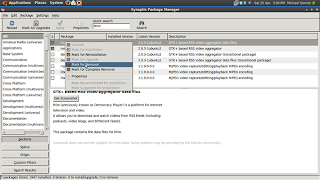
3. Reinstall Miro-data followed by Miro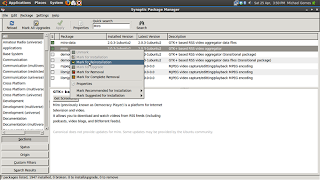
4. Open Miro and go through the first start wizard, if your feeds haven't appeared by magic continue to the next step.
5. Open your Home directory
6. View hidden files and folders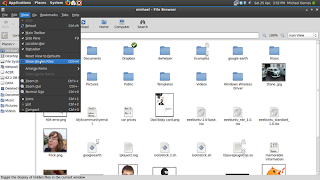
7. Find folder called .Miro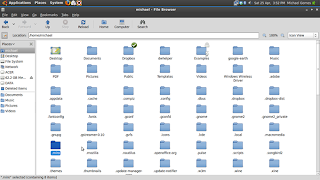
8. Click on any of the log files (the one with out the number is the most recent)
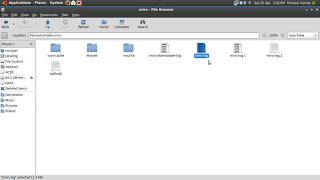 9. Look for the feed URLs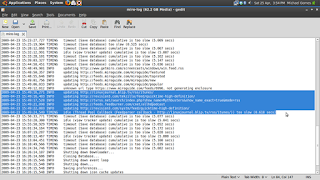
10. Copy and paste them one at a time into Miro through the "Add Download" dialogue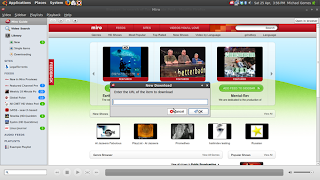
11. Enjoy all your feeds again!
Before installing Miro I had a hunt round on the internet to see whether it was compatible or not. A quick google search only turned up bug reports saying that Miro constantly crashes in 9.04 and sometimes even takes X11 with it! I decided to give it a wide berth until a version for 9.04 exists.
However all is not lost. As with just about any Linux problem there is a workaround and you can retrieve all your feeds!
If you are installing Miro from a fresh copy of Jaunty then all you need to do is go into synaptic search for Miro and install it.
For people upgrading from 8.10 where Miro was already installed then during the upgrade process it will have uninstalled itself. However it wasn't a clean uninstall and the files left behind cause problems when reinstalling.
So the workaround is:
1. Launch Synaptic and search for Miro


3. Reinstall Miro-data followed by Miro

4. Open Miro and go through the first start wizard, if your feeds haven't appeared by magic continue to the next step.
5. Open your Home directory
6. View hidden files and folders

7. Find folder called .Miro

8. Click on any of the log files (the one with out the number is the most recent)
 9. Look for the feed URLs
10. Copy and paste them one at a time into Miro through the "Add Download" dialogue

11. Enjoy all your feeds again!
Subscribe to:
Posts (Atom)

