
OK after another failed attempt at installing Mac OSX (OSX86) on my PC I ended up reinstalling Vista (grrr) forgetting that Windows loves nothing better than breaking GRUB making my Ubuntu hard drive (which I'd unplugged for safety) unbootable (or it could have been a throw back to failed attempts at dualbooting) either way I was getting the dreaded GRUB Error 2 message.
A quick google search brought up this stupendously simple guide to getting everything working again :-)
So pop over to Ramblings of an old man to solve your GRUB booting woes.
Oh and in a moment of weakness I themed Vista to look like Windows 7. Best theme I found to do it is by deviantartist Mufflerexoz and can be found here. I might even upload a screenshot in a bit.
Tuesday, 19 May 2009

Saturday, 2 May 2009
Netbook Remix is back
So far I've only had experience with Ubuntu as a Linux operating system. This is fine because both my eeepc and desktop run versions of Ubuntu. My brother's eeepc 701 however is still running Xandros, an operating system I know little about.
When my brother's wifi packed up on his eeepc all my wonderful Ubuntu knowledge was as useful as a chocolate teapot (and less tasty too!). My solution was to install Ubuntu 9.04 Netbook Remix on his eee, this way at least I'd know what I was talking about.
Installation went smoothly and after finding out that the UME launcher is really, really buggy and slow on a 701 I switched him to the default Ubuntu.
After my success on his eee why not stick it on mine again? I'm much more knowledgeable than the last time I did it and I won't make the same mistake I did last time and try to install everything on the 4GB soldered SDD!
Installation was, again, smooth this time however I was careful in the partitioning of my drives:
When my brother's wifi packed up on his eeepc all my wonderful Ubuntu knowledge was as useful as a chocolate teapot (and less tasty too!). My solution was to install Ubuntu 9.04 Netbook Remix on his eee, this way at least I'd know what I was talking about.
Installation went smoothly and after finding out that the UME launcher is really, really buggy and slow on a 701 I switched him to the default Ubuntu.
After my success on his eee why not stick it on mine again? I'm much more knowledgeable than the last time I did it and I won't make the same mistake I did last time and try to install everything on the 4GB soldered SDD!
Installation was, again, smooth this time however I was careful in the partitioning of my drives:
4GB Soldered on-board SSD, 4GB partition formatted to EXT4 for /
16GB SSD, 2GB partition formatted for swap
16GB SSD, 4GB partition formatted to EXT4 for /usr
16GB SSD, 10GB partition formatted to EXT4 for /home
With root installed on the blazingly fast 4GB soldered SSD my eee now boots in just under 30 seconds! I haven't even started tweaking grub (and the rest!) yet.
The UME interface runs really slow on both the 701 and 900 but there is a fix (gotta love that open-source goodness) you need to download and install linux-image-2.6.28-11-generic_2.6.28-11.43~lp349314apw5_i386.deb and linux-headers-2.6.28-11-generic_2.6.28-11.43~lp349314apw5_i386.deb for both me and my brother this fixed the problem.
Can't wait to start hacking GRUB etc and get my boot speed down :-)

16GB SSD, 2GB partition formatted for swap
16GB SSD, 4GB partition formatted to EXT4 for /usr
16GB SSD, 10GB partition formatted to EXT4 for /home
With root installed on the blazingly fast 4GB soldered SSD my eee now boots in just under 30 seconds! I haven't even started tweaking grub (and the rest!) yet.
The UME interface runs really slow on both the 701 and 900 but there is a fix (gotta love that open-source goodness) you need to download and install linux-image-2.6.28-11-generic_2.6.28-11.43~lp349314apw5_i386.deb and linux-headers-2.6.28-11-generic_2.6.28-11.43~lp349314apw5_i386.deb for both me and my brother this fixed the problem.
Can't wait to start hacking GRUB etc and get my boot speed down :-)

Saturday, 25 April 2009
How to install Miro in Ubuntu Jaunty Jackalope 9.04
After installing 9.04 I began reinstalling all of my programs only to find that many of them don't have official support for the new version and are a pig to setup!
Before installing Miro I had a hunt round on the internet to see whether it was compatible or not. A quick google search only turned up bug reports saying that Miro constantly crashes in 9.04 and sometimes even takes X11 with it! I decided to give it a wide berth until a version for 9.04 exists.
However all is not lost. As with just about any Linux problem there is a workaround and you can retrieve all your feeds!
If you are installing Miro from a fresh copy of Jaunty then all you need to do is go into synaptic search for Miro and install it.
For people upgrading from 8.10 where Miro was already installed then during the upgrade process it will have uninstalled itself. However it wasn't a clean uninstall and the files left behind cause problems when reinstalling.
So the workaround is:
1. Launch Synaptic and search for Miro 2. Remove the package called "Miro-data"
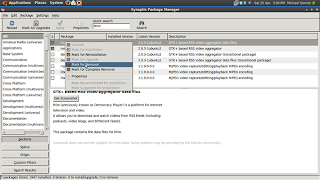
3. Reinstall Miro-data followed by Miro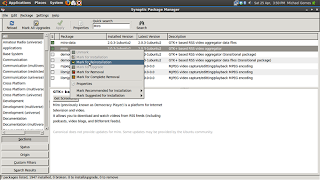
4. Open Miro and go through the first start wizard, if your feeds haven't appeared by magic continue to the next step.
5. Open your Home directory
6. View hidden files and folders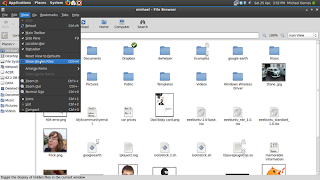
7. Find folder called .Miro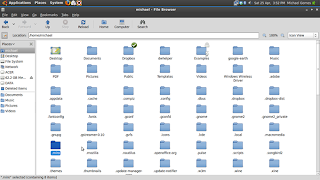
8. Click on any of the log files (the one with out the number is the most recent)
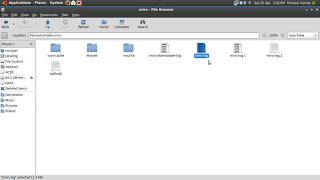 9. Look for the feed URLs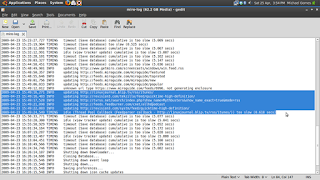
10. Copy and paste them one at a time into Miro through the "Add Download" dialogue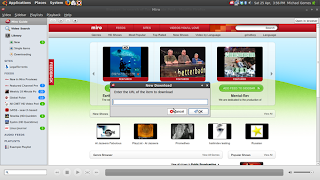
11. Enjoy all your feeds again!
Before installing Miro I had a hunt round on the internet to see whether it was compatible or not. A quick google search only turned up bug reports saying that Miro constantly crashes in 9.04 and sometimes even takes X11 with it! I decided to give it a wide berth until a version for 9.04 exists.
However all is not lost. As with just about any Linux problem there is a workaround and you can retrieve all your feeds!
If you are installing Miro from a fresh copy of Jaunty then all you need to do is go into synaptic search for Miro and install it.
For people upgrading from 8.10 where Miro was already installed then during the upgrade process it will have uninstalled itself. However it wasn't a clean uninstall and the files left behind cause problems when reinstalling.
So the workaround is:
1. Launch Synaptic and search for Miro


3. Reinstall Miro-data followed by Miro

4. Open Miro and go through the first start wizard, if your feeds haven't appeared by magic continue to the next step.
5. Open your Home directory
6. View hidden files and folders

7. Find folder called .Miro

8. Click on any of the log files (the one with out the number is the most recent)
 9. Look for the feed URLs
10. Copy and paste them one at a time into Miro through the "Add Download" dialogue

11. Enjoy all your feeds again!
Thursday, 23 April 2009
I think we're gonna need a bigger alphabet
So with all the plans I've just gone through I've run out of letters! I'm writing this from my iPod Touch!
OS X appeared to install correctly until I tried to boot it! In verbose mode it told me it was waiting for root device. So after trying a number of boot commands I found a site which suggested bypassing Apple's bootloader and loading OS X from GRUB. Fine I thought I'll just boot up ubuntu and edit the grub menu file. Only to find grub gives me error 17! (can't find the disk).
Ok so not too bad. I saved a copy of my grub file before I started changing things. I'll just boot from the ubuntu live cd and replace the current grub file with the old one. Except you can't write to root owned drives in a live cd.
So back to plan "A" from 3 posts ago! I've just finished making a large partition that I'm going to backup my home directory to. Then I'm going to do a fresh install of 8.10 upgrade to 9.04 (which was released today) and live happily ever after.
So cross your fingers for me will ya?
update: Just had a thought! Mac OS X only needs 5GB of space to install on! I just happen to have a (very) old 13GB (yes I said 13) drive lying around! So next time I install OS X I'll reduce my ubuntu partition make a seperate partition for my home directory formatted to fat32 so that all 3 OSes can use it. Leave the fat32 partition on my vista hard drive and use it as a backup. Install OS X on the 13GB drive and point them all to the 1st fat32 partition to use as home/my documents/whatever the mac equivalent is!
Sorted, once I can fix my current installations!
update 2: OK Vista's still working and Ubuntu 8.10 is working just waiting for it to finish updating 564 packages and then I'll update to 9.04 (mmm cutting edge!)
OS X appeared to install correctly until I tried to boot it! In verbose mode it told me it was waiting for root device. So after trying a number of boot commands I found a site which suggested bypassing Apple's bootloader and loading OS X from GRUB. Fine I thought I'll just boot up ubuntu and edit the grub menu file. Only to find grub gives me error 17! (can't find the disk).
Ok so not too bad. I saved a copy of my grub file before I started changing things. I'll just boot from the ubuntu live cd and replace the current grub file with the old one. Except you can't write to root owned drives in a live cd.
So back to plan "A" from 3 posts ago! I've just finished making a large partition that I'm going to backup my home directory to. Then I'm going to do a fresh install of 8.10 upgrade to 9.04 (which was released today) and live happily ever after.
So cross your fingers for me will ya?
update: Just had a thought! Mac OS X only needs 5GB of space to install on! I just happen to have a (very) old 13GB (yes I said 13) drive lying around! So next time I install OS X I'll reduce my ubuntu partition make a seperate partition for my home directory formatted to fat32 so that all 3 OSes can use it. Leave the fat32 partition on my vista hard drive and use it as a backup. Install OS X on the 13GB drive and point them all to the 1st fat32 partition to use as home/my documents/whatever the mac equivalent is!
Sorted, once I can fix my current installations!
update 2: OK Vista's still working and Ubuntu 8.10 is working just waiting for it to finish updating 564 packages and then I'll update to 9.04 (mmm cutting edge!)
Totally agnostic!
So I'd love to get into developing, especially for the iPhone platform as I've heard that its easy, fun and a great way to make a bit of money (if you make a successful app). I've got an idea of the app I want to make and I'm all ready to download the SDK (even prepared to run it in Vista to make it work!) when I find out that it's OS X only!
Great! So as is often the case with my technological ventures... on to plan B (Yes another one!) I'm going to run OS X on my PC.
Now before I go any further this breaks the EULA. Apple clearly states that Mac OS X can only legally be run on an Apple machine (and no sticking a sticker on it doesn't count, although I'm going to anyway). The other thing is DO NOT PIRATE MAC OS X I have downloaded a full OS X iso designed to run on PCs BUT I have also bought a copy of OS X off of Apple so that I will still technically be running code I have paid for. (Admittedly I got student discount!)
My 1st problem, as anyone whose seen my system specs floating around in forums will know, is that I've got an AMD processor. Thankfully after a little searching I've found that it isn't the problem it used to be.
For the installation I've utillized the free space on my Vista hard drive (meaning if I screw everything up GRUB and Ubuntu will still be intact to remidy the situation) formatting it to Fat32 which will get formatted to HFS(+?) by the Mac installer. None of my other drives are formatted to Fat32 so theres no possibility of me getting the drive wrong.
So I'm about to do the installation and I'll update again from either OS X, Ubuntu (if everything goes wrong) or my EEE PC (if I totally screw up!)
See you on the other side!
Great! So as is often the case with my technological ventures... on to plan B (Yes another one!) I'm going to run OS X on my PC.
Now before I go any further this breaks the EULA. Apple clearly states that Mac OS X can only legally be run on an Apple machine (and no sticking a sticker on it doesn't count, although I'm going to anyway). The other thing is DO NOT PIRATE MAC OS X I have downloaded a full OS X iso designed to run on PCs BUT I have also bought a copy of OS X off of Apple so that I will still technically be running code I have paid for. (Admittedly I got student discount!)
My 1st problem, as anyone whose seen my system specs floating around in forums will know, is that I've got an AMD processor. Thankfully after a little searching I've found that it isn't the problem it used to be.
For the installation I've utillized the free space on my Vista hard drive (meaning if I screw everything up GRUB and Ubuntu will still be intact to remidy the situation) formatting it to Fat32 which will get formatted to HFS(+?) by the Mac installer. None of my other drives are formatted to Fat32 so theres no possibility of me getting the drive wrong.
So I'm about to do the installation and I'll update again from either OS X, Ubuntu (if everything goes wrong) or my EEE PC (if I totally screw up!)
See you on the other side!
Saturday, 18 April 2009
Well Plan "A" was ditched
So I'm blogging from... Duh Duh Duuuuh... Ubuntu 8.04!
Why? Well for one thing I don't really want to do a fresh install if I can help it as I've only just got ubuntu the way I want it. The second thing is that I've fixed my wireless... Kinda?!?
The wireless card in my box (Netgear WG311Tv1) doesn't play nice with my ubuntu (YMMV). I happen to have a ton of netgear stuff hanging around my room including a WGPS606 wireless printer server with 4 lan ports on the back! The damn thing is designed to be a wireless hubby thing that you attach all your ethernet and (in the case of a printer) USB cables to so that they sit on your wireless network happy as larry!
So after trying to install the Windows drivers with ndiswrapper and making it so that ubuntu can no longer see my internal wireless card I dug out a ethernet cable and my printer server. Turns out I also solved the problem of getting the damn thing to connect to my wifi and act as a printer server in the 1st place because the default IP of the printserver was way outside that of my network!
So I'm happy, Munkey's happy and ubuntu's happy :-)
Why? Well for one thing I don't really want to do a fresh install if I can help it as I've only just got ubuntu the way I want it. The second thing is that I've fixed my wireless... Kinda?!?
The wireless card in my box (Netgear WG311Tv1) doesn't play nice with my ubuntu (YMMV). I happen to have a ton of netgear stuff hanging around my room including a WGPS606 wireless printer server with 4 lan ports on the back! The damn thing is designed to be a wireless hubby thing that you attach all your ethernet and (in the case of a printer) USB cables to so that they sit on your wireless network happy as larry!
So after trying to install the Windows drivers with ndiswrapper and making it so that ubuntu can no longer see my internal wireless card I dug out a ethernet cable and my printer server. Turns out I also solved the problem of getting the damn thing to connect to my wifi and act as a printer server in the 1st place because the default IP of the printserver was way outside that of my network!
So I'm happy, Munkey's happy and ubuntu's happy :-)
Friday, 17 April 2009
Spring Clean
It's that time of year! Time for my desktop to get a spring clean. I'm going to upgrade to ubuntu 8.10!
There are a couple of reasons for this:
1. WiFi (Again)
Despite Vista, my iPod, my EEE PC, my brother's EEE PC and Desktop all showing very good signal on my Wireless network Ubuntu insists that the signal is very poor. Even to the point where it is dropping out and asking for my WPA passcode every 30 seconds!
2. Well there is no 2 but the WiFi is the thing which has finally forced me to upgrade.
So next post should be from 8.10 see you soon.
There are a couple of reasons for this:
1. WiFi (Again)

Despite Vista, my iPod, my EEE PC, my brother's EEE PC and Desktop all showing very good signal on my Wireless network Ubuntu insists that the signal is very poor. Even to the point where it is dropping out and asking for my WPA passcode every 30 seconds!
2. Well there is no 2 but the WiFi is the thing which has finally forced me to upgrade.
So next post should be from 8.10 see you soon.
Subscribe to:
Posts (Atom)

